Confirm a pending supplier invoice when it is approved and ready to be included in the property’s payment records. Review its supplier, amount, allocation and available funds before confirming.
Invoice confirmation and bank confirmation are separate
Confirming the pending invoice changes its payment-ready records. Complete the actual supplier payment and match the withdrawal during bank reconciliation.
On this page: Review the invoice · Confirm it · If Confirm is unavailable · Check the result
Review the pending invoice
- Open Pending Payments in the side menu to find outgoing supplier invoices.
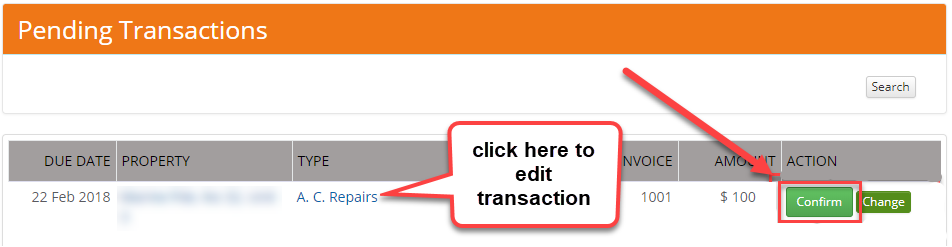
- Find the invoice and check its property, supplier, invoice number, amount and service description against the original invoice.
- Check the property has the appropriate available funds and that the same invoice has not already been paid or confirmed elsewhere.
- If a detail needs correction, use Edit or open the transaction-type link to view the record. Save the supported correction before proceeding.
Confirm the invoice
- Check the date displayed for confirmation. Use the appropriate date for confirming the invoice for payment; check any period or previous-disbursement restriction before proceeding.
- Select Confirm for the intended invoice.
- Check the confirmation result. If a warning appears, resolve its cause before retrying.
If Confirm is unavailable
- Missing supplier: open or edit the invoice and select the correct supplier. If necessary, complete supplier and bank setup first.
- Insufficient released funds: check the property’s released amounts, fees and charges. Keep the invoice pending while the funding or allocation is being resolved.
- A date or permission restriction: use the supported correction process. Do not change the date merely to get past a warning; contact support if needed.
Check the result and pay the supplier
Check the invoice’s updated state and its effect on the property’s Booking Report. Review Trust Account > ABA Export for eligible supplier payment instructions. A supplier marked No EFT Transfer needs its separate payment arrangement.
Use Export and complete bank payments to process payment, then Daily bank reconciliation to confirm the actual bank movement.
Can I add an invoice now and pay it later?
Yes. Save it as Pending when adding the invoice, then complete this review when it is ready.