Invoice in BookingTrust needs to be created every time you record a payment that is made from the Trust/Host Account to a third party (i.e: when you pay your contractors for maintenance or repairs straight from the Trust/Host Account).
Those funds will be deducted from the owner's income as an expense and they can be added to your ABA file if you have set up your contractor's record with their bank account details.
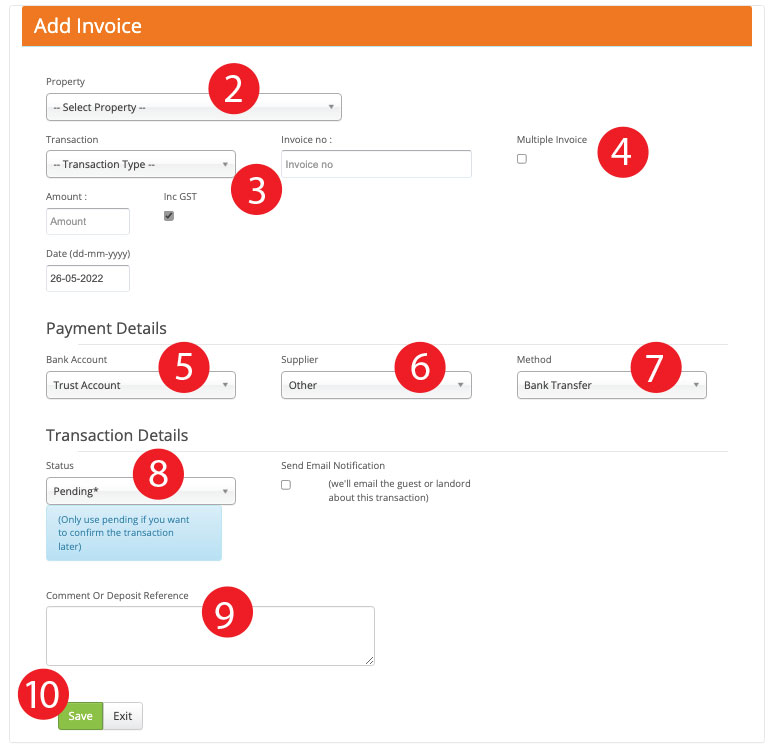
To Add a new Invoice:
-
Go to Transactions > Add Invoice
-
Select your property
-
Select transaction type, invoice number, date and amount
- Multiple Invoice - check this box if you are using the same invoice number for different BookingTrust Invoice records (i.e: you may have received one invoice from your contractor with multiple items that will need to be charged to different properties - you will then add a separate Invoice record in BookingTrust for each property using the same invoice number)
-
Payment details - Bank account - this field will show your default bank account - it should be set to Trust/Host Account.
-
Payment details - To Account - select your service provider account if previously set (see: How to set up contractors record) or select Other.
-
Select Payment Method
-
Select your invoice status:Active - use this option when you're ready to pay the invoice (the invoice amount will be taken of the owner's remittance amount and ready to be disbursed. If you pay your contractors from the trust account and you have their bank details recorded in Booking Trust, your contractor's bank details and the invoice amount will be added to the ABA file)
Pending - use this option if you want to record the invoice now but you want to pay it later. Once you're ready to pay it, you can confirm your invoice and release the funds -
Comment - add a description that will be shown on the booking report for the owners
- Save
Adding Contractor's Details (Companies and Services)
Adding multiple invoice records with the same invoice number - Multiple Invoice