Correct a booking's dates, amount or other details, then check the saved booking and its reports. Make sure you have found the right booking before changing it.
Choose where to make the correction
If your PMS manages the booking, correct it there first and check what arrives in BookingTrust. Use these manual steps for bookings managed directly in BookingTrust, or for a local correction agreed for your integration.
Edit the booking
- Find the booking in the booking list. Search by its reference or guest name and check the property and stay dates.
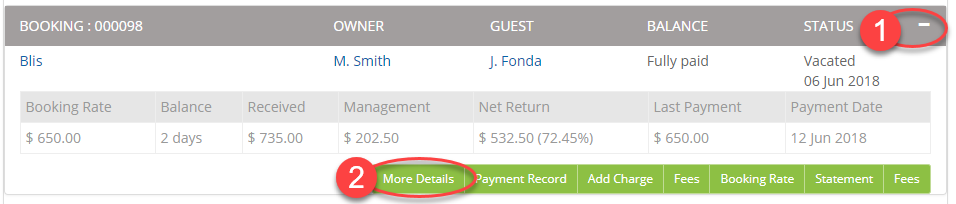
- Expand its row with +, then select More Details.
- Select Edit at the top of the booking details.
- Change the relevant available fields, such as Start Date, End Date, Booking Amount, Bond Amount, booking source or reference. Leave unrelated fields unchanged.
- Select Save, then reopen the details to check the result.

Check the financial result
Check the saved dates and amounts and review the Booking Report before disbursement. A date correction can change the reported number of nights. An amount correction should be checked against the booking's charges, payments and balance.
Editing a booking amount does not itself receive money or pay a refund. If the booking has already been released or disbursed, follow Modify a confirmed or released booking before making financial corrections.
How do I change the guest's name?
From the booking details, select the guest's name to open their contact record, then select Edit. Use genuine contact information. If required details are unavailable, obtain them or ask support how to complete the record; do not enter invented email addresses or phone numbers.
Why is Edit or a field unavailable?
The available controls depend on your access and how the record is managed. Check that you are editing the booking rather than a payment transaction. Ask your account administrator or support if the required booking control is unavailable.
Related: Add or change a bond amount · Add a booking manually