Add a property manually when it is not already in BookingTrust. You will need the property's details and the correct owner contact.
Before you start
Search Properties > Active Properties first. If a connected PMS supplies your properties, check its import or sync before creating a manual copy.
Use the actual owner's email address and details. Being the property's manager does not make you its owner.
Add the property
- Go to Properties > Add Property.
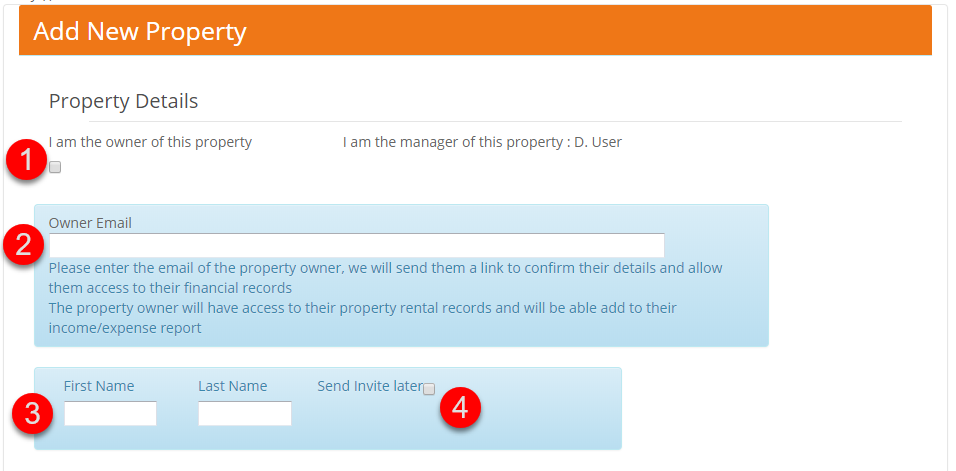
- Enter the Owner Email and check the owner details that appear. Complete the owner's name if prompted. If you personally own the property and the I am the owner of this property option is available, select it.
- Review any owner-access or invitation options shown before saving.
- Complete the required property details, including its nickname and address. Check these against your property records.
- Select Save, then open View Details.
- Check the property and owner association. You can also find the saved record under Properties > Active Properties.
Finish the financial setup
Before disbursing funds for the property, check the owner's bank details and the property's fee setup. Review any property-specific fee rates rather than assuming that the general rates are suitable.
- Add or check the owner's bank details
- Set property-specific fee rates
- Add a booking manually, if your PMS does not supply it
What if the property already exists but has the wrong owner?
Use the owner-linking or change-of-owner process, as appropriate. Creating a duplicate property is not the correction process.