Use a property’s Fee Rates to set an exception to its inherited default or contract rate. This changes a fee rule for that property; it is different from adding one charge to a booking or owner report.
Confirm the property before saving
Check the property reference and the fee’s source. If you only intend a property exception, do not edit the account’s top-level default or the shared contract rate.
On this page: Before you start · Set the property rate · Check affected bookings
Check the fee you want to override
- Find the property and note its current fee type, calculation, rate and Payable On basis.
- Check whether the rate comes from the global level, an assigned contract or an existing property entry. Match the intended fee type and basis when creating an exception.
- Confirm whether the change is ongoing or only for one occurrence. Use Add Management Fee for a one-off property charge instead.
Set or change a property rate
- Go to Properties > Active and find the property.
- Expand the property with + and select Fee Rates.
- Use Edit for the intended fee, or Add Fee when adding the property-specific exception. Copy the relevant fee type, calculation and payable basis from the rule you are overriding, then enter the agreed property rate.
- Confirm that the form identifies the intended property. Check any effective date, tax inclusion and advanced flags before selecting Save.
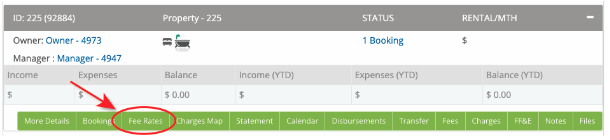

Check the rate and the affected bookings
- Reopen Fee Rates and confirm that the property-specific rate and calculation are correct.
- Review a representative current booking’s Fees and Payment Record. Check the owner report before any further disbursement.
- Check a newly imported/created booking as well as any existing booking that needs the revised rate. A property update can recalculate eligible existing records; do not assume every past or disbursed item has changed.
Changing who is charged needs extra care
Changing Charge Guest or gross/net calculation can affect charge/payment allocation, not just the percentage. If existing bookings show duplicate cleaning or other charge entries, ask support for the correct refresh/correction rather than adding or deleting entries to make them balance.
Need the inherited rate again? A zero-rate exception and removal of an override are different changes. Check the effective fee source and ask support before removing a record; do not assume deleting it is the same as charging zero.
Changing a shared contract? Review Profile > Contracts and which properties are assigned before changing its rates. Use a property exception when the other properties should keep their existing arrangement.