Close a completed calendar month after checking its bank transactions and balances. BookingTrust then lists the closed month and its reports so you can review and retain the monthly records.
Before closing the month
Resolve unexplained differences first. Closing restricts changes to that period; if it later needs reopening, contact support.
On this page: Prepare the records · Close the month · Check and save reports · Complete owner payments · Common questions
Prepare the month’s records
- Have the bank statement ready. Use the opening and closing balances for the calendar month and the actual trust or host bank account being closed.
- Complete the transaction records. Check that receipts, payouts, invoices, refunds and other relevant movements for the month are recorded against the correct accounts and properties. Have the supporting bank and channel/provider reports available.
- Reconcile the bank activity. Match the month’s bank transactions and dates, then check the saved daily reconciliations. Follow Daily bank reconciliation.
- Review funds intended for payment. Check the relevant bookings, cancellations, fees, charges and owner details. Release only the bookings ready for the planned disbursement. Future or ongoing bookings may still have funds held.
If a difference remains, use Investigate a reconciliation difference before closing. Do not change a bank balance or add an unexplained adjustment to make the month agree.
Close the month
- Go to Trust Account > End of Month and check the bank account shown.
- Select Close Month.
- Select the Month and Year you are closing.
- Enter Bank opening and Bank closing from that month’s bank statement. These are bank balances, not the amount due to owners.
- Check the entries and select Save.
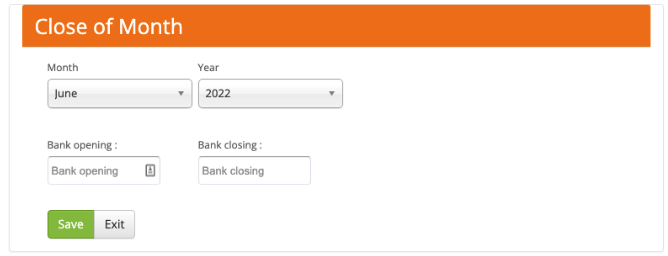
Use the opening and closing bank balances for the selected month.
BookingTrust checks both balances against its bank records. If they agree, the month appears in the End of Month list as closed. Check that the account, month and balances are the ones you intended.
If a balance error or difference is shown, check the statement figures, confirmation dates and missing or duplicate transactions before trying again. The displayed difference needs an explanation, not an artificial balancing entry.
Check and save the monthly reports
From Trust Account > End of Month, find the month and use its report buttons to view or download the records. Check the account and printed reporting period in each report.
| Report | What to review |
|---|---|
| 3-Way Report | The bank and trust-ledger figures shown for that month. |
| Trial Balance | The ledger balances and report totals. Compare the corresponding opening, credits, debits and closing figures with the month-end listing. |
| Bookings Held | Bookings with funds held at the month end. |
| Deposits and Withdrawals | The month’s recorded incoming and outgoing bank transactions. |
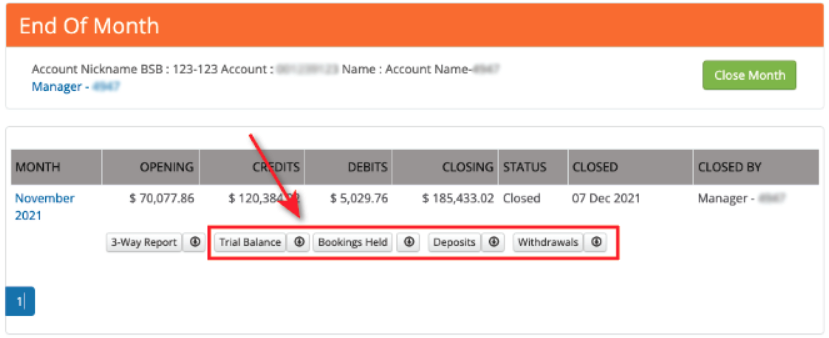
Retain the reports with the supporting statements and complete your organisation’s review and approval process. Investigate any report figures that do not agree for the same account and period.
Complete owner payments separately
Closing the month does not disburse owner funds or send bank payments. Review the property Booking Reports, fees and charges, then follow Disburse property funds and Export and complete bank payments.
The calendar-month close can be completed before or after the monthly disbursement. Follow your organisation’s approved sequence and keep transactions on their actual dates; do not backdate a payment to make it appear in an earlier month.
Common questions
Can I close last month after the new month has started?
Yes. Select the month being closed and use its opening and closing bank-statement balances. A later owner payment is recorded on its own actual transaction date.
Do all booking funds need to be paid out first?
No. Check the records and release only funds ready for the appropriate disbursement. Held funds for future or ongoing bookings can remain in the account.
Can I reopen a closed month?
Contact support before changing closed-period records. Include the account, month, reason and affected transaction references so the supported correction or reopening process can be assessed.
Related guides
PDF companion
Download the End of Month Procedure manual (PDF) as a companion reference.