Releasing a Booking is a final step in the process of handling booking in BookingTrust.
Click on Unconfirmed Paid in the menu on the right hand side.
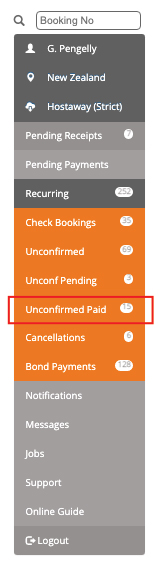
In BookingTrust, once the booking is finished and all charges and payments are recorded, we can Release our booking which will instruct our system to release any funds associated with it to be disbursed at the end of the month.
Once Released, the booking funds are released and will appear in the disbursement screen. Read about How to Disburse Funds.
Note: Once the booking is released in Booking Trust you cannot adjust any charges, fees or payment records.
The booking is completed and the payments for this booking have already been released in our system, they are now ready to be disbursed.
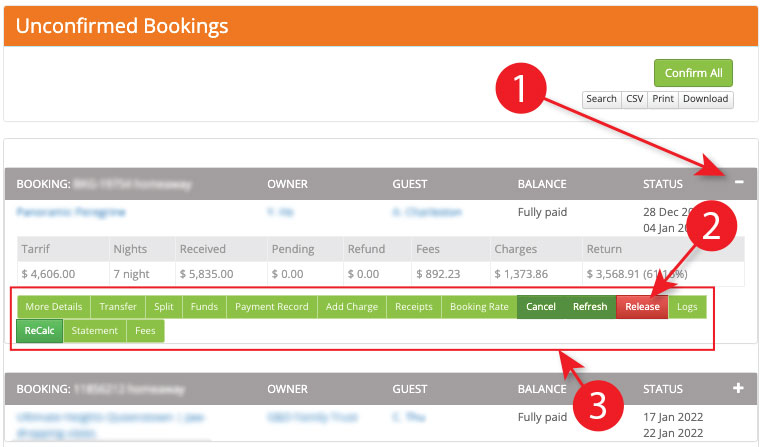
- Click on the + sign to see bookings
- To Release your booking, click on the Release button on the booking submenu.
- More Details: Show the details of the booking
Transfer: Transfer the booking to another property
Split: Transfer some of the funds to another property based on a date
Funds: Transfer part of the funds to another booking
Payment Record: A list of the payment details within the booking
Add Charge: Add a booking charge to the booking to be paid by the guest or the owner
Receipts: A list of receipts for the booking
Booking Rate: Not applicable
Cancel: To cancel a booking and removed all charges and fees
Release: If a booking is checked out and fully paid it can be released to be disbursed
Logs: A log of all changes and additions of the the records
ReCalc: Recalculate the fees and charges on a booking (not usually required unless instructed by support)
Statement: A ledger of the financial transactions on a booking
Fees: All the fees associated with the booking