Booking Trust will import bookings from Newbook.
All past bookings (where the guest has already checked out) will be marked as unconfirmed in Booking Trust: Bookings > Unconfirmed or on the right-hand side menu: Unconfirmed
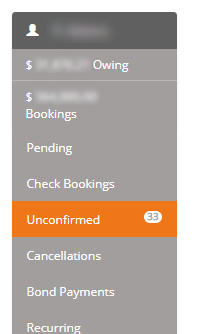
Unconfirmed bookings in Booking Trust refer to bookings that are completed (guest checked-out) but you have not yet released the funds for.
First, we'll need to check if the booking payments and charges have been correctly reconciled in Booking Trust against what is stored in Newbook. We'll do it by connecting our system to Newbook and retrieving their information from GL codes setup - click here to find out more.
By default, this reconciliation will run automatically every 4 hours but you can reconcile booking anytime by clicking on Reconcile button:
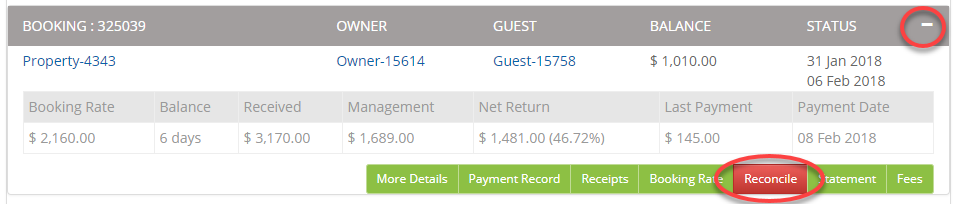
Once done, your booking Booking Balance column should display "Fully Paid" and you're ready to confirm the booking and release funds.
Before you confirm the booking, please double check if all charges, payments, and fees have been added. Once you confirm the booking, we will not be able to add any more fees or transactions to it. We will treat it as if the money has already been released therefore we cannot allow any further changes made to that particular booking. (You can, however, record a fee against the property at any time).
To confirm the booking, click on the + to display the menu and click Confirm button.
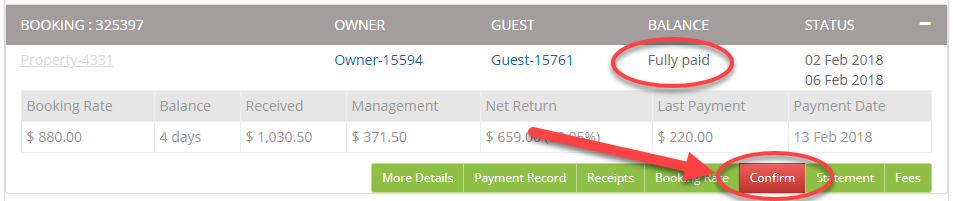
Once done, this booking will disappear from the list of Unconfirmed bookings and funds (owner's remittance and your management fees) will be ready to be disbursed.