Newbook has created a new filed in your GL codes setup section that is crucial for Booking Trust connectivity.
Note that this field will only appear for clients that have the Booking Trust connectivity enabled (this is done by Newbook Team).
Each inventory item can now be identified by Booking Trust as either a fee that should go to the owner or as a management fee.
To make sure that each charge is identified correctly, please go through each of our inventory items and check if the GL code is correctly set up for Booking Trust:
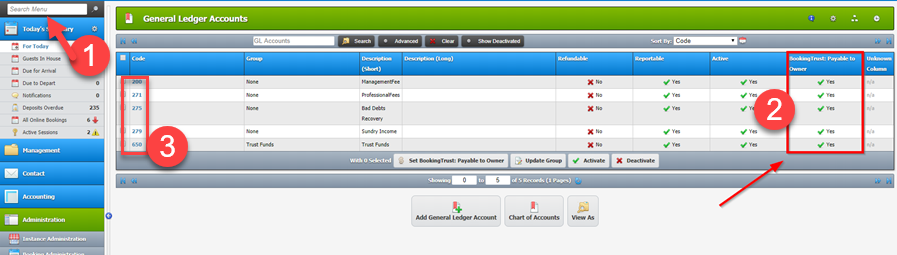
1) In the top left hand corner in your search menu, type GL Accounts and open.
2) You will see on the right-hand side of each GL account, there is a setting for “BookingTrust: payable to Owner” Yes or No.
3) Please click on all applicable GL Account Codes
4) select Edit Gl Account
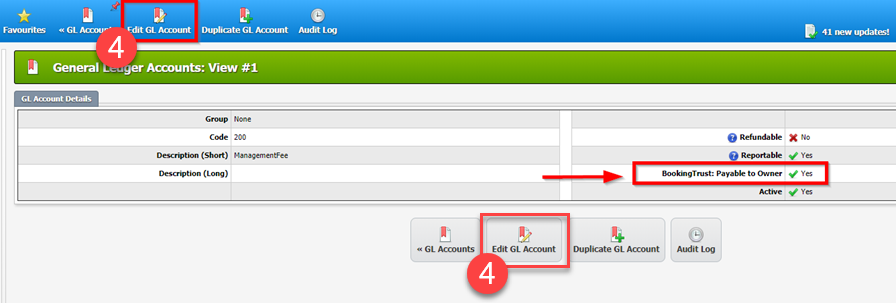
5) change your setting to Yes if you wish this GL code to be Payable to Owner

In NewBook GL code set up there is a field called 'BookingTrust to pay owners'

By default, this is set to 'Yes'. You will be required to change this field to 'No' on all the GL codes that are not paid to the owner.
For example 'Cot hire' will be checked as 'No', so that all Guest charges relating to the 'Cot hire' GL code will be paid out to the management, not to the owner.