Global Fees that you set up in Profile > Global Fees will apply to all properties and all bookings.
- Properties > Active Properties > choose the property in question or look it up using "Search" button. Open up booking menu by clicking on a plus sign

- Click on Fee Rates menu item
The list of current fees for that property will be visible here.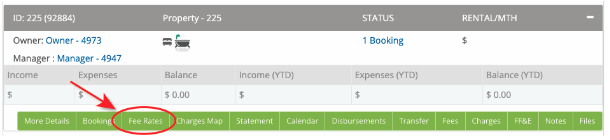
- To modify the Global Fee entry add a new Fee (Add Fee button) and select the same options that the Global Fee entry has. Saving details will override the Global fee set previously, it will be marked as modified on the Property Level.

To double check what options are selected for the Global Fee entry go to Profile > Global Fees and click Edit button on the right-hand side of the screen.
You can make further changes to that entry by clicking Edit button