Record agent/channel commission according to what the guest paid, what your account actually received and who pays the agent. Gross booking value, net bank receipt and commission are different amounts.
Record the real receipt once
If an agent retains commission before paying you, record the actual net receipt. Do not add a fictitious receipt for the withheld amount or repeat a commission/credit already supplied by an integration.
On this page: Identify how the agent is paid · When you receive the gross amount · When commission is withheld · Check the allocation
Identify the payment arrangement
| Arrangement | What to establish |
|---|---|
| You receive the guest’s full booking payment | The agent is paid separately. Decide whether the commission is recovered through management/trading or paid to the supplier from trust. |
| The agent deducts commission before remitting the balance | The bank receives a net amount. Check the channel statement and the existing booking’s gross/net value, agent fee and any booking credit. |
Check the channel statement and your agreed owner/management arrangement. The same channel can use different collection models, so do not choose a method only from its brand name.
When you receive the full booking payment
- If the commission is handled through management/trading, use the supported agent-fee setup under Global Fees or the effective property rate. Check the Travel Agents payable basis and the RS Reference required by your integration.
- If the agent is paid directly from trust as a supplier, use the appropriate invoice and supplier-payment workflow. Do not add an equivalent management expense as well unless both represent distinct, valid costs.
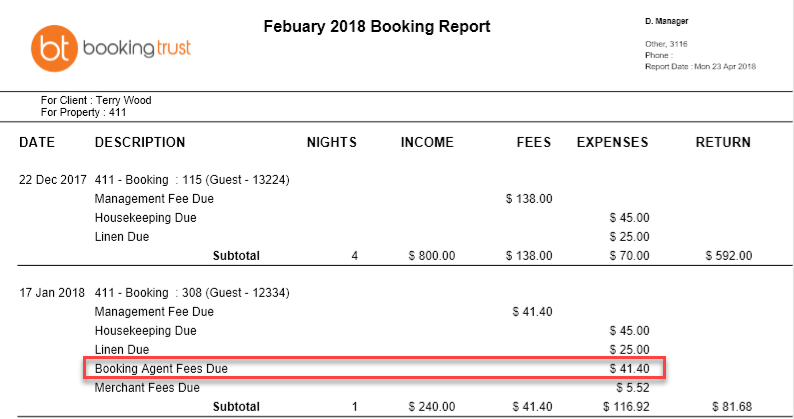
An amount shown as an owner expense is not proof the agent has been paid. Review who receives the disbursement and complete the actual payment separately.
When the agent withholds commission
- Compare the booking value, actual payout and commission on the channel statement. Check the Payment Record and Statement for entries already imported.
- Record only a genuinely missing actual receipt. If the booking retains a gross value, use the verified commission/booking-credit treatment for that setup rather than reducing or increasing the bank receipt.
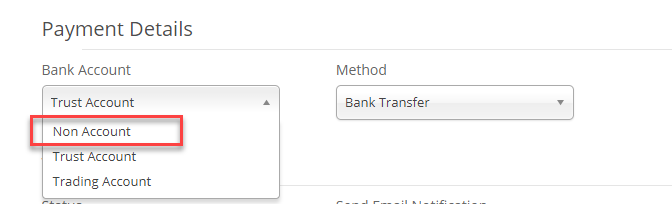
- Where a Booking Credit is the agreed way to represent the withheld commission, use Non Account for that non-cash adjustment. A booking credit is not money received or a second payment to the agent.

A stand-alone account may instead use an agreed net-booking-value model. Do not change an imported booking’s value or add a credit solely to make it Fully Paid; confirm which model applies first.
Check the owner and management result
- Trace the commission, receipt, credit if applicable and management-fee calculation base. Check the effective property/contract rate, not only the global percentage.
- Review On gross amount, Charge Guest, Deferred and other agent options only as part of a verified setup. They can affect allocation and fee calculations; copying another account’s flags can give a different owner return.
- Check the owner report and the actual bank payout. Do not delete a valid booking credit or adjust a commission by an unexplained difference just to balance the booking.
Ask support if gross/net figures disagree, the channel reference is unclear or existing bookings need refreshed allocation after a rate/Charge Guest change. Include the booking reference, channel payout breakdown and expected owner/management treatment.