Release a completed booking so its funds are available for disbursement. This guide covers the usual process after a guest has checked out, including the checks to make before release and what to do if a warning appears.
Before selecting Release
Check checkout, full payment, confirmed bank reconciliation, and the booking’s fees and refunds.
On this page: What release means · Before you start · Release a booking · Resolve a warning · Common questions · Get help
What booking release means
Release makes the booking’s associated funds available in BookingTrust’s disbursement process. You can then review the booking and its released amounts in the property’s reports.
| Stage | What it means |
|---|---|
| Payment reconciled | The recorded payment has been checked against the bank transaction. |
| Booking released | The booking’s funds are available for disbursement. |
| Funds disbursed | The disbursement has been recorded in BookingTrust. Processing the bank payment is a separate step. |
Releasing a booking does not send a bank payment. For the next stage, see How to Disburse Funds.
Before you start
For a normal completed stay, check that:
- The guest has checked out. This guide covers completed stays.
- The booking shows Fully Paid. Investigate outstanding, pending or unexpected amounts first.
- The relevant payments are confirmed through bank reconciliation. Use the Statement and Payment Record to check the details.
- Fees, charges and refunds are correct. Review cleaning fees, management fees, guest charges and any refunds that apply.
Cancelled booking? Review what was received, what was refunded and any remaining fees before deciding what can be released. Contact support if the remaining balance or its allocation is unclear.
How to release a booking
- Find the booking. Search using the booking number or guest name. You can also use Unconfirmed Paid to find completed bookings awaiting release.
- Open the booking menu. Select the + beside the booking.
- Review the records. Check the Payment Record, Statement and Fees, and complete the checks above.
- Select Release. If a warning appears, use the guidance below before changing any records.
- Check the result. Go to Trust Account > Disbursements, find the property and review its Booking Report. Confirm the booking and released amounts appear as expected.
Another way to find a booking: open the property under Properties > Active, choose Calendar and open the reservation. Check the displayed status and calendar legend.
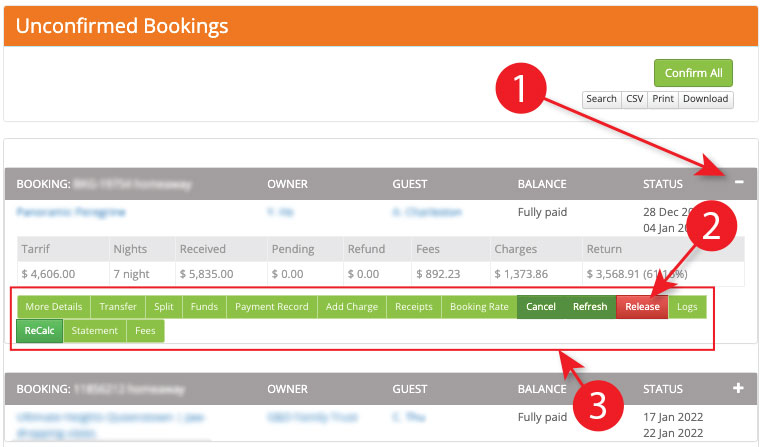
Expand the booking to show its actions, then select Release.
If a booking cannot be released
| What you see | What to check |
|---|---|
| Unconfirmed transactions or a pending payment | Compare the Statement and Payment Record. Is the payment still expected, received but not reconciled, or already recorded with a pending entry left behind? The warning alone does not prove the guest owes money. Ask support if the records do not agree. |
| Booking is not Fully Paid | Review receipts, charges, refunds and the remaining balance before deciding what needs correcting. |
| Guest charges and refunds do not match | Check the breakdown in the Payment Record. Accommodation and guest charges can be allocated differently; a matching total alone may not resolve the issue. |
| Booking is missing from a disbursement report | Check the booking’s release status, pending amounts and any release warning. A booking can exist without being ready for disbursement. |
| There has already been a disbursement today | A disbursement has already been recorded for this property today. Contact support to agree the next step before attempting further release or payment changes. |
| Booking is released, but disbursement is unavailable | Check the property’s linked owner and required bank details, then follow the disbursement guide. |
Keep financial records accurate
Do not delete transactions, add balancing credits or change reconciled amounts just to clear a warning. If ReCalc is suggested, or a correction is unclear, ask support for instructions appropriate to that booking.
Common questions
Does Release pay the owner?
No. Release makes the booking’s funds available for disbursement. Recording disbursement and processing the bank payment are separate steps.
The booking is Fully Paid. Why is there still a warning?
Its overall balance may agree while a payment remains unconfirmed, a pending entry is unresolved, or guest-charge and refund allocations do not match. Check the Statement and Payment Record before changing anything.
Can I correct a booking after it has been released?
Ask support to check the required correction and the booking’s current state. The appropriate steps depend on whether funds have since been disbursed and whether the affected transactions are reconciled.
When to contact support
Contact BookingTrust support if you cannot explain a pending amount, allocations do not agree, a reconciled transaction needs correcting, or a released booking needs a change.
Include the booking number and property reference, the exact warning, checkout status, and the checks you have already made. Include relevant payment or refund details; omit unrelated personal or banking information from screenshots.