When you add an invoice in Booking Trust you can set its status to:
- Active
When you're ready to pay the invoice (the invoice amount will be taken of the owner's remittance amount and ready to be disbursed. If you pay your contractors from the trust account and you have their bank details recorded in Booking Trust, your contractor's bank details and the invoice amount will be added to the ABA file) - Pending
When you want to record the invoice now but you want to pay it later.
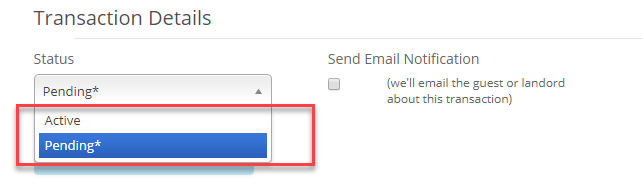
Once you select status: Pending, this invoice will be added to the Pending transactions list on the right-hand menu.
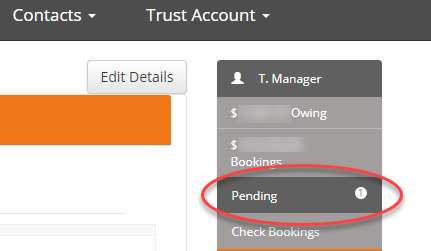
When you're ready to complete those transactions, click on the Pending link to view the list.
On the right-hand side you'll have the 2 options:
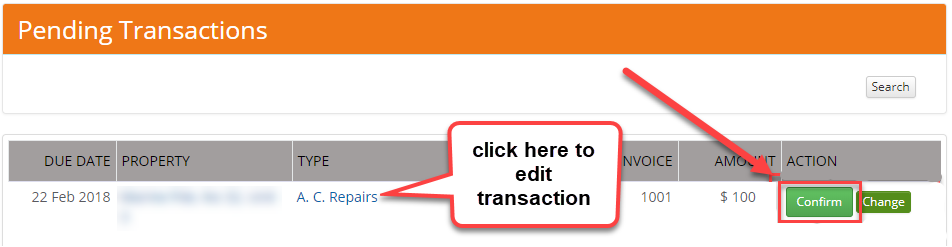
- to Confirm the invoice (release money for the contractor - the invoice amount will be added to the next disbursement of this property's funds as an Expense) or
- to edit the invoice - click on the transaction type link, on the next screen you'll be able to make a correction or to delete the transaction if needed
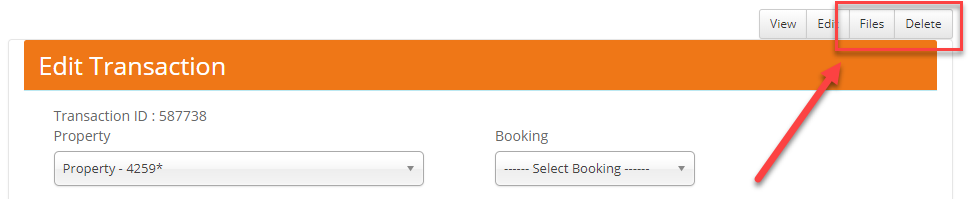
To edit or delete the invoice or to add a file to an invoice click on the Transaction Type link on the Pending Transactions screen and use the top menu buttons: