Owners statement will only include information about confirmed bookings (if you're using Newbook PMS - see more info here: Reconciling and Confirming bookings).
To see owner's statement go to Trust Account > Disbursement
Expand the view of the property in question by clicking on the + sign.
Select Booking Report option from the submenu:
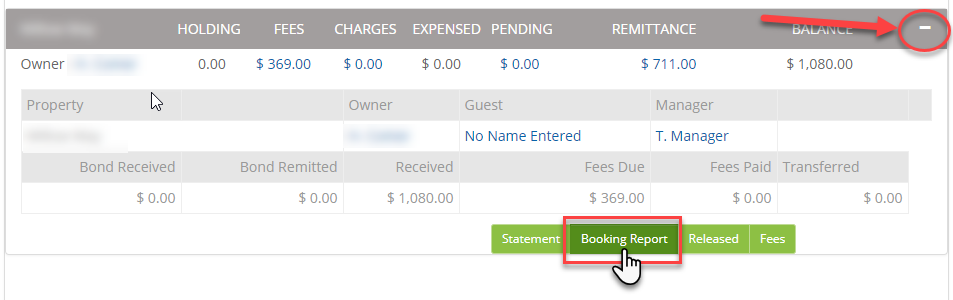
The owner's statement will appear in a pop-up window where you can view or download it.
Your owner's statement will look like this:
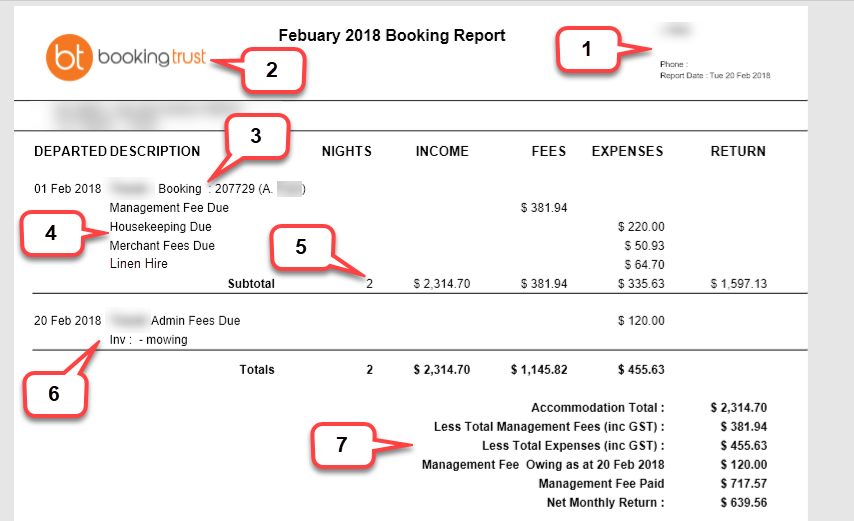
- Your business details
- Your logo
- Each booking will be displayed in a separate section. In the first line, you'll see the booking dates, booking number, and the guest name
- This is the list of fees that are attached to this booking - this will be your management commission and other management fees set in the Global Fees section
- Number of nights the guest stayed
- This section shows all additional fees for services that were added to this property (not attached to any booking). This is done by adding the management fee in Reports > Add Management Fee
- Summary of accommodation cost, fees and expenses