 |
Download End of Month Procedure as a PDF |
This end of month procedure outlines the process to close the month and disburse funds as required in BookingTrust.
The end of month procedure can be run prior to or after the monthly disbursements, as the end of month work on a calendar month.
For example, you can disburse November bookings on the 4th Dec and close the month of November on any date in December (the first week is recommended).
We strongly recommend that daily bank reconciliations are done in order to prepare for the end of month process. That will ensure that your bank balance is already reconciled to your cash book.
Preparation
- Ensure all transactions for the month have been entered into the Cashbook and that the reconciliation from the bank statement has been completed throughout the month.
- Ensure all bookings have been confirmed that are required to be disbursed.
Close Month
If you are satisfied that all the transactions and reports are correct, you may then Close the Month.
Go to Trust Account > End of Month, click Close Month.
- Select the Month and Year you wish to close.
- Enter the Opening & Closing Balance from the bank statement for the month
- Click Save
If the month balances, you will see it listed at the End of Month Listing. You will get a message stating Month does not balance if there is an error.
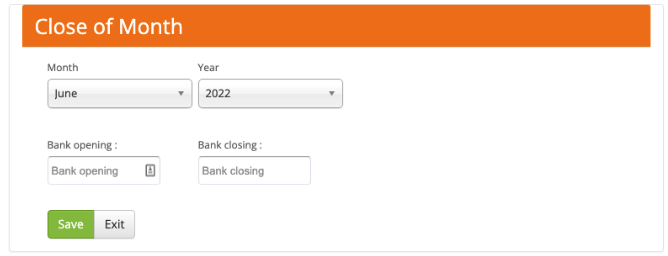
If there is an error, you will need to go through the statement for the month and determine which transactions are required to be adjusted or inserted.
This process checks the confirmed bank transactions against the balances in your bank account.
If the amounts balance, you will see the month listed in the End Of Month listing.
Important: Please take care when closing the month, you cannot re-open a month. If for some reason you are required to re-open a month please contact BookingTrust Support, it may be chargeable.
End of Month Reports
Go to Trust Account > End of Month
- Save and Print the 3 Way Balance report.
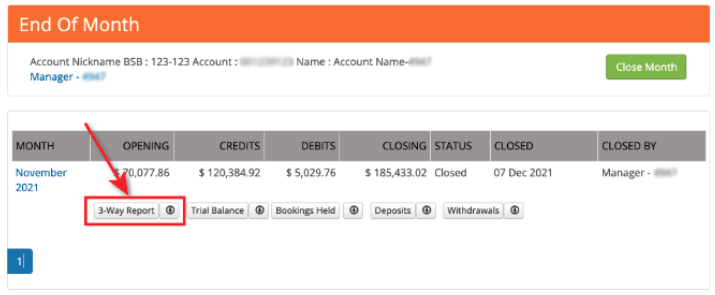
- Get the Principal / Licensee to sign off before proceeding to the next step.
It is the Licensees in charge responsibility to ensure they are satisfied that the Trust Account has been properly handled, and ultimately, they are responsible for it. Do not disburse funds until this is done.
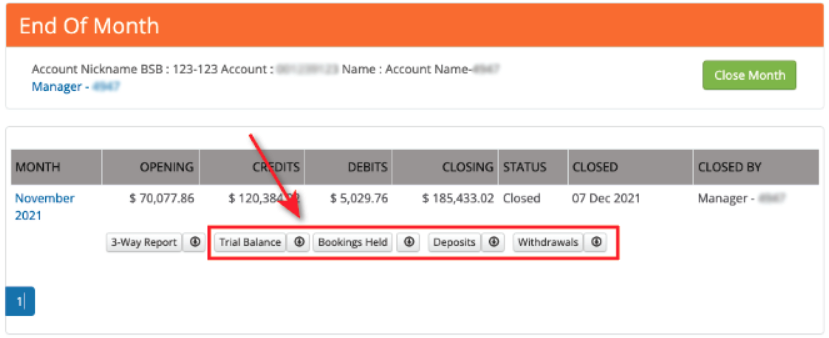
If for some reason you need to re-open the end of the month, contact BookingTrust via a support ticket and explain the situation and details of the month that need to be re-opened, they will assist in re-opening the month. Please note this may be chargeable. - Print the Trial Balance, Bookings Held, Deposits and Withdrawals Reports required for auditing purposes available, once the month is closed. Download these reports and print and file for your end of year audit.
Disbursements
This may be done at any stage prior to closing the month, however, ensure your account is reconciled.
Read about How to Disburse Funds
Management Fees
Go to Reports > Management Paid and print the report for the current close month.
This will give a breakdown of the Management Fees and Charges paid.
Transfer Payments
If you have an ABA facility with your Bank use the steps for ABA Export, if not use the Manual Transfer steps.
ABA Export
- Go to Trust Account > ABA Export. The list of funds to be transferred displays.
- If you have an ABA facility with your bank, click Download ABA. The ABA file is created for upload in your Bank Software.
- If you don’t have an ABA Facility you can transfer the funds manually in your bank software. enter the details on the screen report directly into your banking interface and then select 'Transferred' to clear the list.
Manually Transfer
- Go to Trust Account > ABA Export. The list of funds to be transferred displays.
- If you don’t have an ABA Facility you can transfer the funds manually in your bank software. Use the details on screen report to transfer the appropriate funds to each payee.
- Select 'Download ABA' to download the ABA file to be processed
- Select 'Clear ABA to clear the list and record the payments in BookingTrust.