Check the business bank account records BookingTrust uses for owner funds and management fees. If accounts were prepared during setup, edit those records rather than adding replacements.
Keep existing account records
Transactions may already be linked to these records. Do not delete an account to correct its details. Use Edit, and check with support before changing which real bank account a record represents.
On this page: Understand the account roles · Update the details · Choose the default account · Check the setup
Understand the two account roles
| Account role | Purpose in BookingTrust |
|---|---|
| Trust/Host Account | The account holding booking money collected on behalf of owners. BookingTrust uses this account for the relevant cashbook, reconciliation and outgoing owner or supplier payments. |
| Trading Account | Your business account, including the destination for management fees and charges paid to the business. |
These are your business account records. Owner and supplier destination bank details belong on their own contact or property records.
Update the business bank details
- Go to Profile > Bank Accounts.
- Identify the existing Trust/Host and trading records. Select Edit beside the correct account.
- Enter a clear NickName, the correct bank code or BSB, Account Number and Account name. Use the details supplied by the bank; do not assume all account numbers have the same length.
- For the account holding owner funds, select This is a Trust/Host Account. Keep the trading account identified separately.
- If you will use ABA export, check the bank’s required export details, including Bank, ABA User Name and ABA User ID where applicable.
- Select Save.
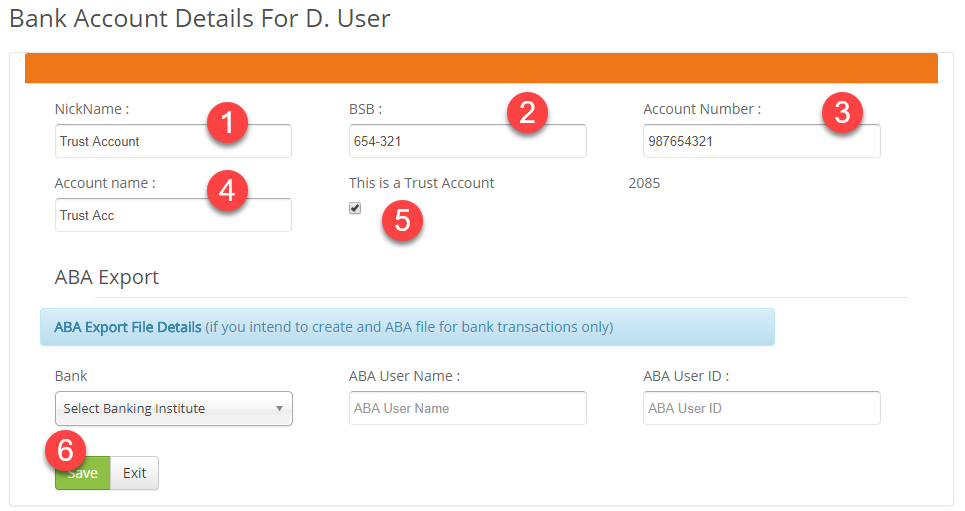
The example labels the checkbox This is a Trust Account; the current form uses This is a Trust/Host Account. If you are setting up a standalone account and the required record does not exist, use Add Bank Account as agreed during setup. For a prepared or integrated setup, ask support before adding extra accounts.
Choose the default account
Return to the bank account list. Select Make Default beside your Trust/Host Account. The default can be preselected in transaction forms, so still check the funding account before saving an invoice or disbursement.

Check the saved setup
- Reopen both records and verify their account details and intended roles.
- Check the default marker is on the intended Trust/Host Account.
- Check the trading destination before the first management-fee payout.
Saving bank details does not open a real bank account, move money or reconcile a balance. Continue with Before you go live before processing your first live payout.