If you're using a PMS that doesn't share owner's records with BookingTrust, you will see that all properties will have your details (the property manager's) set as the owner.
- To add the owner's record for each property you will need to Add Profile.
Go to Contacts > Add Contact check the Owner/Landlord box for Account Type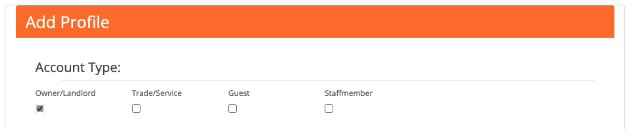
- Add email address - each owner record will have a unique email address, the same email address cannot be used twice.
- The "Don't invite" checkbox is automatically selected - it refers to sending invites to the owners' console giving owners access to all information about their property. Leave this box as is (selected) if you don't want to send an invite.
**Please contact us if you want your owners to have access to the owner console**
- Fill in other contact details and click Save.
- Click on the View Profile link to view or edit owner's record or to add Bank Details
- Next, add the owner's bank details. From the Profile Details screen, select the Bank button on the top of the page.
 NOTE: If you’ve moved away from the Profile Details screen, find the owner’s profile by going to Contacts > Owners then select the owner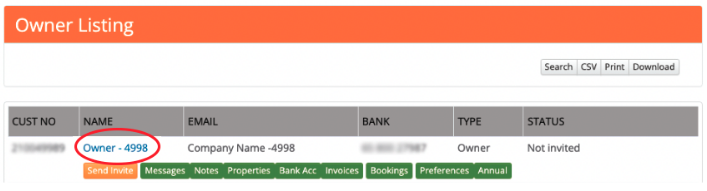
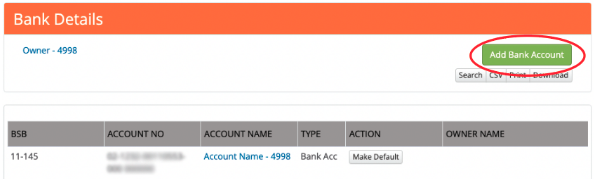
- Click on the green Add Bank Account button and fill out all the details.
- Save changes.
Further Reading Add Owner’s Bank Details
If you're using a PMS that doesn't share owner's records with BookingTrust, you will see that all properties will have your details (the property manager's) set as the owner.
To add the owner's record for each property we need to create Owner contact record.
Go to Contact > Add Contact > Select Owner/Landlord as Account Type
Add email address - each owner's record will have one unique email address, the same email address cannot be used twice.
Note that the "Don't invite" checkbox is selected - it refers to sending invites to the owners' console giving owners access to all information about their property. Leave this box as is (selected) if you don't want to send an invite.
**Please contact us if you want your owners to have access to the owner console**
Fill other contact details and click Save.
Click on the View Profile link to view or edit owner's record or to add Bank Details

Next, add the owner's bank details.
Click on View profile > select Bank button on the top of the page:

Click on green Add Bank Account button and fill out all the details.
Save changes.
You can also access owner's record from the property view (click on the owner's name) or by going to Contacts > Owners
Click here to see more information about adding bank account details.