Please note that if you're using a PMS connected to BookingTrust that handles all transactions (charges and payments), all changes to the booking transactions should be made in your PMS.
Transactions entered manually into BookingTrust - i.e. invoices, need to be edited in BookingTrust
Once you add a transaction to BookingTrust you can make changes to it following the steps below:
- Find the transaction in your Cashbook (go to Trust Account > Cashbook)
- Click on the Transaction number: TRANS#

- On the next screen click on the Edit button to modify the transaction or Delete to remove it
To remove a payment transaction from a booking (in case of an error or duplicate)
Please note that if the transaction already took place we recommend applying a transaction correction to it (if money was returned - a refund record) instead of editing a payment as it will ensure the correct transaction reconciliation.
- Go to the booking and click on The Payment Record

- click on the View button to the right of the transaction in question
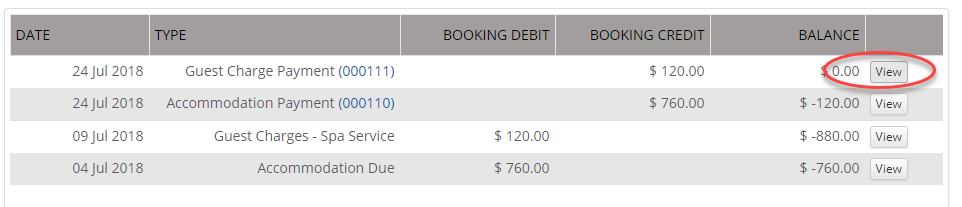
- On the next screen click on the Edit or Delete button (top of the page menu)

To find the transaction in Cashbook:
Go to Cashbook and click the Search button on the top of the screen. Type in the transaction number and click the Search button at the bottom of the search fields area. 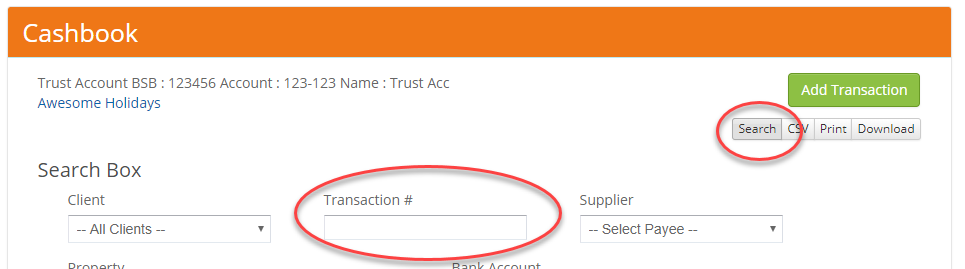
Your transaction will appear on the screen. Follow the steps from the beginning of this article to see how to remove the transaction from Cashbook
Click here to see how to remove or edit a management fee record.