Booking Charge is an item that is recorded against existing booking and can be charged either to the guest (increasing the booking value) or to the owner (as a booking expense - the booking cost will not change). In more details:
Booking Charge - Charge Guest
- the charge amount will increase the booking value
- the transaction will appear under Payment Record as a Guest Charge
- the record of this transaction will also be found under Fees section of your booking - the guest charge amount is management's money therefore at disbursement it will be sent to your trading account as a part of your management fee amount
Booking Charge - Charge the owner
- this charge will be added to the owner's Booking Report as an expense against the booking
- the charge amount will be added to the management fees ledger
- the record of this transaction can be found under Fees column in the section of your booking
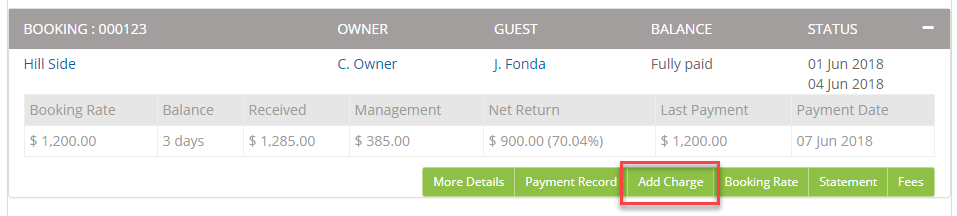
You can add a Booking Charge straight from the Bookings screen:
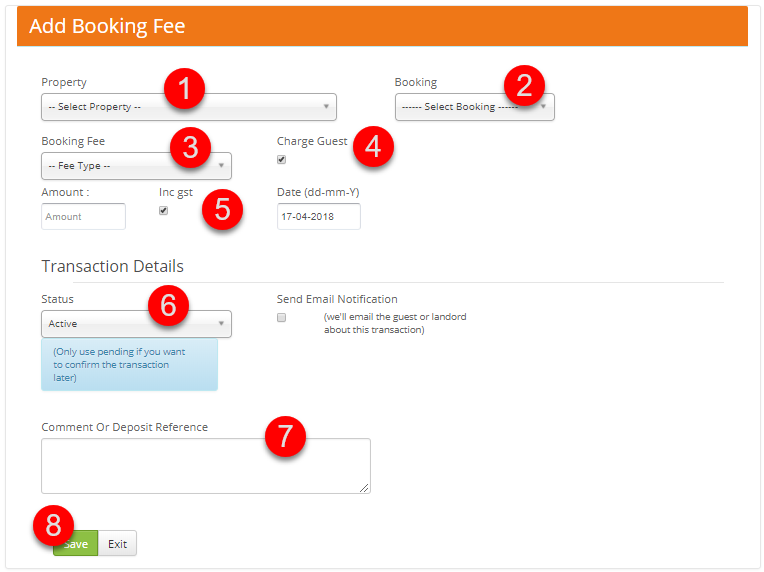
Alternatively, you can go to Transactions > Add Booking Charge and follow the steps below:
- Select the property
- Select your booking
- Choose the booking charge type
- Check the "Charge Guest" box if your charge should increase the booking cost and will be paid by the guest.
Untick this box if you wish to charge the owner (it will be added to the owner's Booking Report as a booking expense and paid to you as a part of the management fee). - Set the charge amount and the date
- Make sure that the transaction status is set to Active
- Add a comment - this could a detailed booking charge description that will appear on the owner's Booking Report (if charged to the owner)
- Save