BookingTrust system operates on a logic of having 2 separate bank accounts
- the main bank account where all your booking payments are going into (Trust account or if you're not required to have one - a Host account being standard bank account dedicated for storing payments you collect on behalf of the owners)
- your trading account (a general account where all your business transactions are taking place and where your management fees will be paid to)
As a part of a setup process we'll set your bank account entries for you. All you'll need to do is to edit those entries to update your bank account numbers.
Please do not delete any bank account records (entire entry) as there might be some transactions linked to this bank account record.
Please use Edit button to update the bank account details.
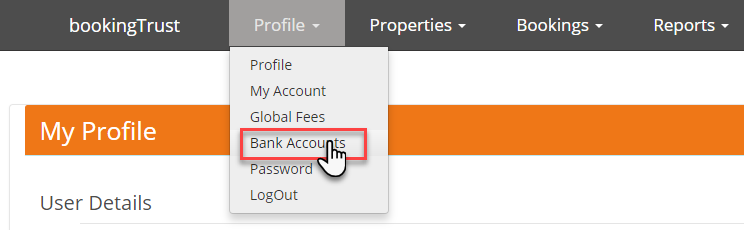
To edit or to create (for standalone clients) your bank account details go to Profile > Bank Accounts
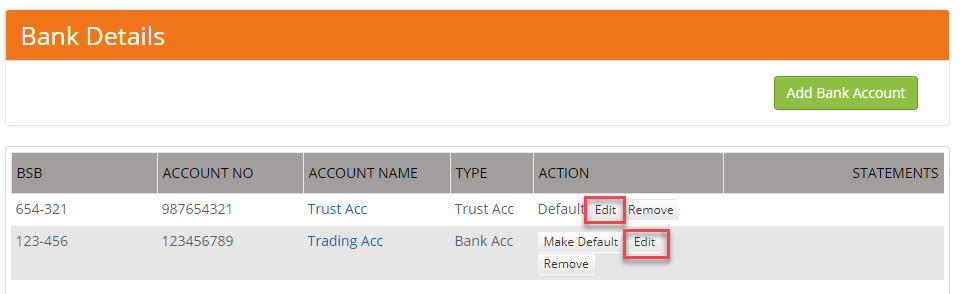
To create your bank account click on Add Bank Account button.
To edit existing record click on Edit button next to the bank account entry you want to update.
Next, edit bank details information and save changes:
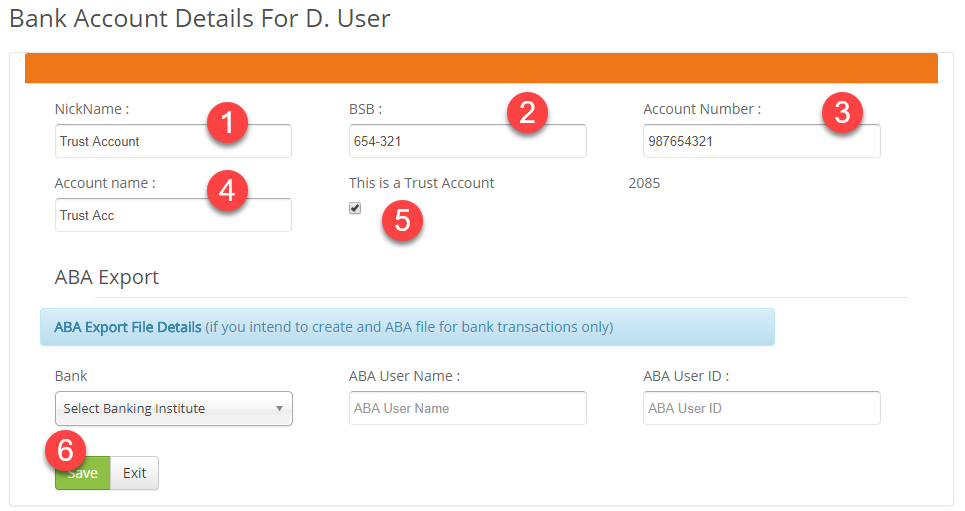
- Give your bank account a nickname - this name will appear in a Bank Account drop-down menu when creating an invoice or confirming disbursement. It will not be visible to anyone but you.
- Enter a 6-digit BSB number
- Enter a 9-digit account number
- Enter your account full name
- If this is your Trust/Host account - make sure that this box is ticked.
Even if you don't have an actual trust account, check this box for this bank account that holds owner's money. Please note that there must be a bank account with this option selected. - Save changes
Once you create all your accounts in BookingTrust, select your Trust/Host account as a default account. Your default account will be preselected automatically in a Bank Account field when creating an invoice or confirming disbursement.
